
Solicitudes
Consulta y gestiona las peticiones de eventos y grupos grandes, y deja constancia del seguimiento de cada una.
La página de Solicitudes reúne en un solo sitio todas las consultas de eventos y reservas de grupo, para que puedas organizarte y responder al cliente sin perder nada.
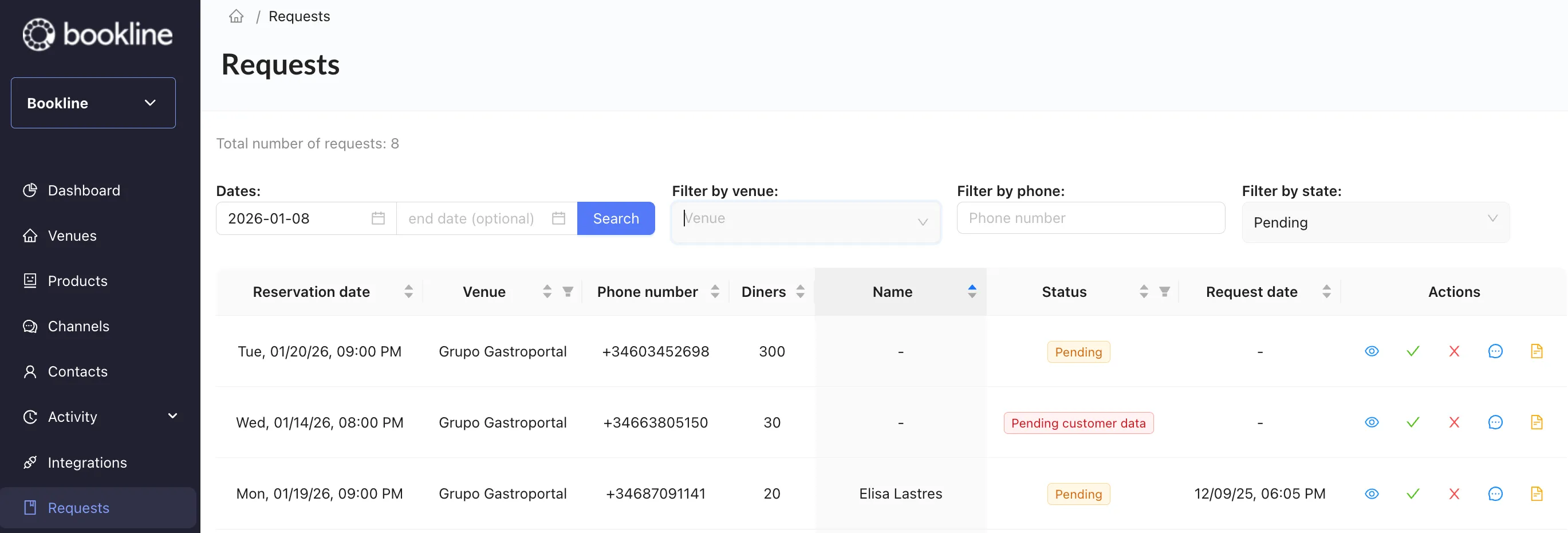
Encontrar una solicitud
Sección titulada «Encontrar una solicitud»Puedes escribir un término de búsqueda o elegir del desplegable en estos campos:
| Campo | Qué hace |
|---|---|
| Fechas | Acota a un rango de fechas de celebración del evento. |
| Filtrar por local | Busca por nombre de local. |
| Filtrar por teléfono | Busca por el teléfono del cliente. |
| Filtrar por estado | Ordena por el estado más reciente. |
Además, puedes ordenar estos campos de forma ascendente o descendente:
- Local
- Teléfono
- Comensales: número de personas
- Nombre: nombre del cliente
- Estado
- Fecha de la solicitud
Acciones
Sección titulada «Acciones»Las acciones te permiten ver el detalle de la consulta, hacer seguimiento de lo que has hablado con el cliente y dejar notas.

De izquierda a derecha:
| Icono | Qué hace |
|---|---|
| Ojo | Ver el detalle de la solicitud. |
| Check | Avisa al cliente de que su petición se ha aceptado. |
| Aspa | Avisa al cliente de que su petición se ha rechazado. |
| Mensaje | Deja constancia de que has contactado con el cliente. Al cliente no le llega nada. |
| Documento | Añade una nota interna sobre la solicitud. |